
A content delivery network (CDN) can make your website faster and reduce the work your hosting server has to do. It also introduces another layer to watch. Your public website can look healthy while the server behind it is struggling, or that server can be healthy while visitors have trouble reaching the CDN.
For website owners, agencies and developers, the useful question is: are we monitoring both?
Understand the two layers
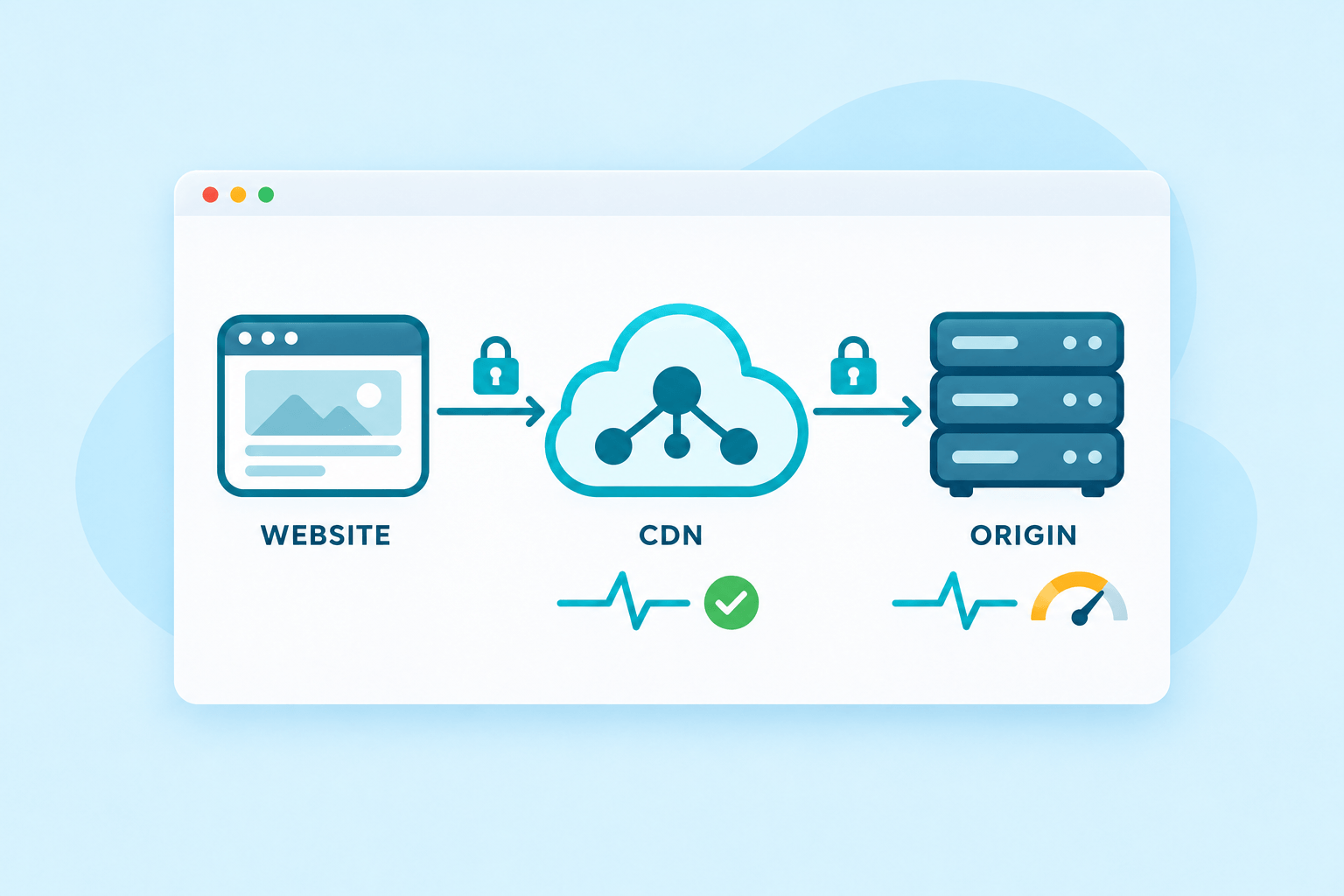
In a typical reverse-proxy setup, visitors connect to the CDN first. Its distributed servers can return cached copies of eligible content, such as images, stylesheets and JavaScript. Your origin server is the server behind the CDN that supplies the original content and runs your application.
When a requested resource is missing from the cache, the CDN fetches it from the origin. Requests for dynamic, uncached pages may need the origin every time. A fast cached homepage therefore tells you little about the health of your database or checkout.
Prepare for a cold cache
In its 11 November 2026 guidance, Google explains why moving to a CDN can increase origin traffic. Faster responses can gradually encourage more crawling, where there is demand. Meanwhile, the new CDN starts with an empty, or cold, cache, so requests for uncached resources still reach your origin.
This describes existing behaviour, rather than a new Google rollout. The effect depends on your traffic, caching rules and CDN protections.
A complete cache purge can create a similar pressure. Cloudflare warns that repopulating the cache can increase origin requests and overload a server. Prefer targeted purges when they meet your needs.
Before changing providers or clearing everything, check origin capacity and warm important cacheable URLs at a controlled pace. Start with public static assets. Keep private or personalised responses out of shared caches unless your application has explicitly designed safe caching rules. Test both logged-in and logged-out behaviour. Cloudflare's default caching documentation illustrates why the actual configuration matters.
Match each monitor to a question
Use separate signals for separate questions:
- Can visitors reach the website? Monitor important public URLs for availability and slow responses. Where useful, add a content check for a stable phrase that should be present. This does not prove a complete customer journey works.
- Is the origin healthy? Use a configured server health endpoint to report relevant checks, such as server load, memory, database access or application queues. Your server performs these tests; Semonto reads their results.
- What is the CDN doing? Review the provider's cache statistics and logs alongside origin metrics. They help explain cache misses and request volumes that an external uptime check cannot diagnose.
Keep health endpoints out of the CDN cache so you receive current results. If your health framework deliberately caches expensive tests briefly, understand that delay too. Protect the endpoint and arrange authorised monitoring access while keeping the origin restricted. If an approved monitoring path is unavailable, use your hosting provider's or internal health checks instead.
Remember both TLS connections
An HTTPS reverse proxy normally has two separate TLS connections: browser to CDN, and CDN to origin. A certificate check against your public hostname usually sees the CDN certificate. It does not automatically check the certificate served by your origin.
Configure HTTPS on both connections and validate the origin certificate, using a setting such as Cloudflare's Full (strict) mode. Agree who owns renewal and deployment for each certificate, and how expiry or installation failures will be detected.
There is a trust distinction too. A Cloudflare Origin CA certificate is intended for Cloudflare's connection to your origin. Ordinary browsers and public certificate checkers generally do not trust that private chain. Arrange origin certificate expiry checks through your hosting provider or protected internal tooling. Do not expose the origin or weaken TLS validation just to make a public test pass.
A short before-and-after checklist
Before a migration or major purge: record normal public response and origin health, choose warning thresholds, name the person responding, and agree when to pause or roll back.
After the change: test important public URLs through the CDN, compare origin health with cache-miss traffic, and confirm both TLS connections work. Continue watching as caches warm and traffic changes. A passing check from one location cannot establish that every CDN location works.
Semonto combines website monitoring, server health monitoring and TLS/SSL certificate monitoring. Start with the public URLs and origin signals that matter to your business, then make sure their alerts reach someone who can act.
Latest blogs

Tips and Tricks
Let’s Encrypt’s 64-day certificates: check your renewal setup
Tips and Tricks
DNSSEC's 2026 stress test: what to check before the October root-key rollover
Tips and Tricks